The Graduate School at ESF
Instructions and Guidelines for Formatting Theses and Dissertations

Contents
- Requirements and Guidelines for Completing Graduate Theses and Dissertations
- Formatting the Thesis or Dissertation- Sequencing of Pages
- Bibliography or References
- Graduate School Review & Submitting your Electronic Thesis or Dissertation
- Manuscript Format or Other Type of Style Guide (approved by individual departments)
- Setting up Table of Contents
- Setting up List of Figures/List of Tables
- Forms
Requirements and Guidelines for Completing Graduate Theses and Dissertations
The following are general ESF requirements and guidelines for preparing and submitting theses and dissertations. Individual departments may have additional requirements. The student should consult with their department and/or major professor regarding these specific guidelines.
Document Style
Document styles may vary but must be applied consistently throughout theses and dissertations. The general style manual for the college is the Council of Science Editors Style Manual (latest edition), available in the reference area of Moon Library and at the Reference Desk of Bird Library. The latest edition of APA style is also accepted for theses and dissertations. A department may opt to use a style manual that is more discipline-oriented, please contact the graduate office for approval.
Department Formatting
In opting to use a specific style manual, the department accepts the responsibility of communicating this preference along with any other special requirements to the graduate students concerned. It is the student's responsibility to be aware of the style manual and any special requirements of the department and to have the prior approval of the student's major professor and steering committee concerning the guidelines adopted. Students should be sure to use this style during document preparation. Theses and dissertations will be acceptable as first determined by individual departments.
Digital Commons
The college now participates in electronic archiving through the Moon Library called Digital Commons. The submission of your graduate thesis/dissertation to Moon Library's Digital Commons repository will open your work to the world, if you allow availability. The Digital Commons is fully Google-searchable and provides open access to your work, allowing anyone to download and make non-commercial use of it. Electronic theses and dissertations draw hundreds of downloads from repositories every month. Prospective employers have been known to use electronic theses and dissertations to scout new potential hires. For these reasons it is vital that you ensure that the work you provide is the final version, ready to be shared with the world.
In order to give the Digital Commons a non-exclusive right to reproduce and distribute in electronic format via the World Wide Web, students must authorize this when uploading their documents. Students also have the option of restricting access in the permanent digital archive to local access only (available to ESF students/faculty/staff).
Formatting the Thesis or Dissertation – Sequencing of Pages
Font
Font should be the same size, color, and style throughout the entire document (including chapter and page headers).
Pagination
Front matter
Roman numerals (lower case) should be used consecutively for all pages preceding the document body (for example, i, ii, iii, iv, v, vi, etc.). Please note that while the Title Page and Copyright page do count toward the running total, numerals do not appear on these pages.
Body & Chapters/Main Division of the Body
Arabic numerals should be used consecutively for all pages of the main document, typically beginning with the first page of Chapter 1. Switching to Arabic numbering, the numbering begins with 1 and runs consecutively to the last page of the paper- (i.e. 1,2,3, etc.); a page number must appear on the final page if there is any substantive text. See example on page 17.
Reference this helpful video for tips on breaking up pages and page number conventions in Microsoft Word, but do not follow the remaining formatting suggested by the video.
Front Matter
Front matter includes the “preliminary” parts of the thesis or dissertation, including the Title Page, Copyright, Table of Contents, Lists of Tables and Figures, Abstract, etc. The following suggests formatting for typical front matter pages included in theses and dissertations at ESF:
Title Page
The student is considered the author of any thesis or dissertation and as such only the student's name shall appear on the title page along with the following names to be typed below the degree program for easy identification and future reference.
- the Major Professor (or co-Major Professors, where applicable)
- the Department Chairperson or Graduate Coordinator
- the Chair of the Examining Committee
- Dean of the Graduate School.
The date listed on the title page should be the month and year in which the document was successfully defended. For example, if the defense is April 12, 2021, the date on the title page should be “April 2021.” See sample format on page 9. Please note the following requirements for the title page:
- The title of the thesis/dissertation should be in all caps.
- Please ensure no signature lines appear at the bottom of the page where committee members appear.
Copyright (optional)
The Copyright Act of 1989 does not require that published works carry a copyright notice in order to secure copyright protection. See sample format on page 10.
Acknowledgements (optional)
When the author feels that acknowledgements are necessary, it should be remembered that brevity is a virtue. Section appears after Title Page and/or Copyright.
Table of Contents
The Table of Contents should not reference the content on any pages preceding it (i.e., title page, copyright notice, acknowledgments). Table of Content titles should be limited to one sentence in length, and not multi-sentence. The wording of the chapter titles and all subheadings should exactly follow the wording within the body of the paper. Omit underlining in the Table of Contents. Period leaders between headings and page numbers should be used. All page numbers must be aligned to the right of the page. The last item of the Table of Contents should be your resume and/or vita. Set up Table of Contents using Word to ensure alignment and proper page numbering. See sample format on page 12.
List of Tables
Following the Table of Contents, the List of Tables should follow the exact wording within the body of the paper. Table titles should be limited to one sentence, and not multi-sentenced. Omit underlining in the List of Tables. Period leaders between headings and page numbers should be used. The List of Tables and List of Figures should be on separate pages. See sample format on page 14.
List of Figures
Following the List of Tables, the List of Figures should follow the exact wording within the body of the paper. Titles should be limited to one sentence in length, and not multi-sentence. Omit underlining in the List of Tables. Period leaders between headings and page numbers should be used.
List of Appendices
Following the List of Figures, the wording of the List of Appendices should follow the exact wording within the body of the paper. Omit underlining in the List of Appendices. Period leaders between headings and page numbers should be used. A List of Appendices is only appropriate when the document contains multiple appendices.
Abstract with Key Words
The abstract is the last page paginated with Roman numerals. The abstract summarizes a thesis or dissertation. The abstract page is required and must contain key words listed a few lines below the abstract and a full citation above the abstract. Abstracts are bound with the document and are not to exceed 150 words for a master's thesis, or 350 words for a doctoral dissertation. The abstract date and month should be the same as the defense date in the Title Page.
If the thesis or dissertation is divided into manuscript style, the main abstract should be inclusive of all manuscript content included in the document. Each manuscript may include its own abstract, without a particular word limit. Likewise, the conclusion section should be a synthesis of all included manuscripts. See sample on page 16.
Thesis/Dissertation Body
The “body” is composed of the various chapters of text.
Components
The following are traditional components of the body of a thesis or dissertation at ESF:
- Introduction
- Literature Review
- Models and Materials
- Results
- Discussion
- Conclusions
Chapters or Main Division of the Body
For the chapters and the remainder of the manuscript, including text, charts, illustrations, appendices, bibliography, vita, etc., use Arabic numerals (1,2,3, etc.). Each page must be consecutively numbered in the bottom right-hand margin at the foot of the page. Do not use letter suffixes such as 10a, 10b.
Formatting of Tables and Figures
All tables and figures appearing in theses and dissertations should follow consistent formatting to the style guide chosen. APA 7th Edition changed the formatting for tables and figures from years past. In this edition, the Label ("Figure 1") and the title both go above the table/figure, and then the descriptive caption goes below it. See this example from APA. SCE formatting guidelines require both the title and description appear above tables and figures, such as this example.
Back Matter
“Back matter” is the material following and supporting the main body or text of the thesis or dissertation. Pagination for the back matter remains in sequence and style with the body using Arabic numerals. Arabic page numbering continues consecutively from the Body through the Back Matter section. Following are traditional components of the back matter to be included in theses or dissertations at ESF:
- Reference list or Bibliography
- Appendices
- Resume or Vita (This is the last page of the document and should include the last Arabic page number)
Bibliography or References
The Graduate School recommends that students follow the standard citation format used for the journal publications in the student's field of study. The format must be consistent throughout the manuscript and placement of the bibliography or references should come at the end of the manuscript. Students may also opt to use the Council of Science Editors (CSE) style guide to format their references. A copy of the CSE Style Guide (2014) is available upon request at Moon Library.
Graduate School Review & Submitting your Electronic Thesis or Dissertation
Students must submit draft documents of the final thesis or dissertation, approved by their committee, electronically to graduate services for format review at least two weeks prior to the semester deadline for submission. The Assistant Dean or a graduate assistant will review what you submit and provide feedback concerning the formatting. Documents containing a significant number of formatting errors may be returned to the author for corrections prior to further review. Only the format will be reviewed - not the contents of the complete document. If you do not hear back from the Graduate School, do not assume everything is correct. Check with the office before you submit your final copy.
When submitting your final copy to the graduate office, please submit your document as both a word document and a PDF. Your thesis/dissertation should be saved with the following naming convention:
Lastname_MS or PhD_semester_year
Example: Smith_MS_Spring_2026
After receiving the final version, the Graduate Office will upload your thesis to Experts@ESF - the open access repository of ESF’s scholarship. You will also be given the choice of an optional embargo. The graduate school will email an embargo form for you to complete at the end of the semester. A temporary waiting period before your document is published on Experts@ESF.
Students should get the “Final Thesis/Dissertation Approval Form” also known as the Form 8a
(see Attachment A) signed by all listed members on the Title Page and turn it into the Graduate School, at 227 Bray Hall or graduate services before the final deadline. Students in the Division of Engineering must also
obtain the signature of the Director of the Division of Engineering on the Final Thesis/Dissertation Submittal Form (8a).
Finally, students must pay their Thesis Processing Fee to the Cashier and turn in the Graduation and Key Return Form. These forms are located in Attachment B on page 19 and Attachment C on page 20. Electronic copies of the forms are also found at https://www.esf.edu/graduate/.
Personal Copies/Bindery
If you wish to have personal copies bound, we found two binderies in Syracuse, NY. Please note this is not an endorsement of the bindery, but simply the name of a bindery that might produce single copies:
Please Note: The Department of Landscape Architecture requires students to include the following disclaimer in all theses: ‘The ideas and opinions expressed in this publication are those of the author and should not be interpreted as those of the State University of New York College of Environmental Science and Forestry.’
Manuscript Format or Other Type of Style Guide (approved by individual departments)
The “Title Page”, and copyright if included, should remain unnumbered, and all the rest of the front matter (i.e. the pages following the Title Page, and ending with the Abstract) should be numbered in lower-case Roman numerals, starting with “ii" at the bottom right-hand margin. The front matter should be ordered as shown below, so that the Abstract is the last page numbered with lower-case Roman numerals. The page following the Abstract, which is the first page of the body of the document (Chapter 1/Introduction), should start with page ”1” and Arabic numerals should run thereafter until the last page of the student’s vita at the very end of the document. Identify the name of the style guide on the Abstract page.
- Front Matter:
- Title page
- Acknowledgments
- Table of Contents
- Abstract
- Body:
- Introduction
- Manuscripts
- Conclusions
- Back Matter:
- Literature Cited
- Appendices
- Vita or Resume
Students must submit a vita or resume (See sample on page 17) as the last page of the thesis or dissertation. It is the student's responsibility to ensure that components of all submitted documents are in the correct order, with all pages included.
Document Samples
These linked PDFs demonstrate the proper placement and visual orientation of each noted page type.
- Sample Title Page
- Sample Copyright Page
- Sample Acknowledgements Page
- Sample Table of Contents Page
- Sample Abstracts Page and Resume/Vita Format
- Sample List of Tables
Table of Contents
Proper format for a Table of Contents, listing only the sections of the document that appear AFTER the Table of Contents (i.e., omitting the Acknowledgements, Copyright, and Table of Contents). The Table of Contents should be formatted in Word, with page numbers aligned to the right and page leaders between the headings and page numbers.
A Table of Contents can be constructed in Word based on a pre-existing document with headings and subheadings. Insert the cursor at the start of the document, or where you intend the Table of Contents to appear. In Word, navigate to the References tab, select Table of Contents, Automatic Table 2. This will insert a blank Table of Contents, as seen below.
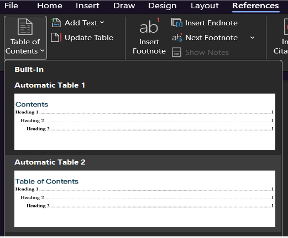
Next, select content to add to the table by highlighting various headers and using “Add Text” under the References tab. Here, you can define the levels of text, which corresponds to the indentation and order in the Table of Contents. You will have to “Update Table” after you “Add Text.”
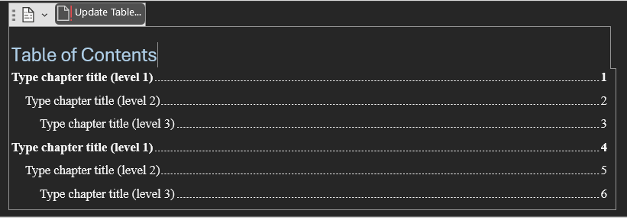
Word will typically reformat your document text once you “Add Text.” You can either reformat the text within the document or reformat the style for the document under Home tab, Styles, then select each layer of text (e.g., TOC 1, TOC2, TOC3, etc.) and select Modify. Here, you can set the text to a specific color, size, or format (bold, italics, capitalized). You can also edit text appearance within the Table of Contents. Each time you Add Text to the table, or change the page location of a heading, you will need to update the table by clicking on the Table of Contents.
For more help on setting up a table of contents, here's a tutorial from Exceldemy.com.
Setting up List of Figures/List of Tables
Formatting a List of Figures and List of Tables is a similar process, but through different options in Word.

First, you must designate the number and description of each table/figure as a Caption. Select the table or figure then under the References tab, select Insert Caption. In the space provided, enter the description of the table or figure. It is likely that Word will reformat your text, but you can define the format within the Home tab, styles, captions, then modify.
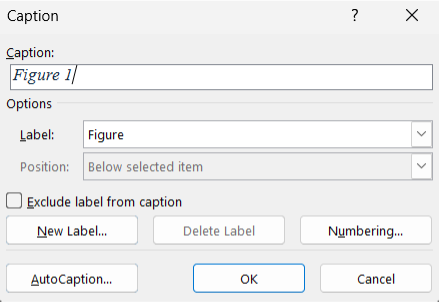 To organize tables/figures by chapters, you can either use a precise numeric or you
can create new, specific labels for the tables and figures of each chapter within
Insert Caption. You should create captions before you insert the Lists.
To organize tables/figures by chapters, you can either use a precise numeric or you
can create new, specific labels for the tables and figures of each chapter within
Insert Caption. You should create captions before you insert the Lists.
Once you have entered all the captions, you can create Lists for Tables and then Figures, or organize each of those lists by chapters. Tables are updated by selecting Update Table from the Captions section on the References tab. A similar List can be created for Appendices, if the end of your document contains multiple Appendices. The List of Tables, List of Figures, and optional List of Appendices are the first items to appear in the Table of Contents. Throughout all tables, remove any optional hyperlinks and use page leaders.
Note: For these lists please only include the label ("Table 1") and a short title, not a full multi-sentence caption. Unfortunately, Word's "autocaption" option for lists of tables and figures inputs the entire multi-sentence caption, so you may need to directly edit the lists after they have been generated to remove any extra sentences.
Forms
A full list of forms are available on the Forms page, but links to some of the most commonly required forms are included below: